


knitCompanion
3.4296.00 Reviews
App Specs
- Version
- 3.0.14
- Updated On
- License
- Free
- Downloads
- 100,000+
- Developer
- Create2Thrive Inc
- Categories
- Lifestyle
- Platform
- Android
Screenshots



 Analysis by AppCompare
Ever felt the need for a trusty sidekick while navigating through the intricate world of knitting? Let me introduce you to knitCompanion, the app that seems to have been crafted with love and precision just for us knitting enthusiasts. Whether you're a seasoned pro or just starting, this app promises to make your knitting journey smoother and more enjoyable.
Getting Started with knitCompanion
First things first, getting knitCompanion up and running on your device is a breeze. Available for both Android and iOS, you can quickly download it from the Play Store or App Store. Once installed, the app opens up with a friendly interface that's both intuitive and aesthetically pleasing.
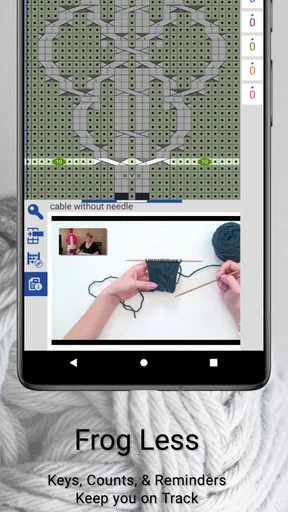
As you dive in, you'll notice a well-organized menu that guides you through its various features. The app provides a quick tutorial to help you understand the basics, which I found incredibly helpful. It's like having a knitting expert sitting right beside you, ready to assist.
The Features You'll Love
The heart of knitCompanion lies in its impressive range of features designed to enhance your knitting projects. One of the most remarkable tools is the "Pattern Management" feature. This allows you to import your patterns directly into the app, where you can mark your progress, add notes, and even highlight specific sections. It’s like having a digital notebook that keeps your projects organized and your mind stress-free.
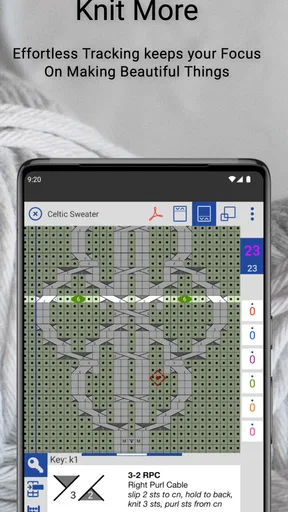
Another standout feature is the "Row Counter." Say goodbye to losing track of your rows! This handy tool keeps count for you, and you can even set alarms to remind you when it's time to switch stitches. It's a game-changer, especially for complex patterns where keeping track manually can become a hassle.
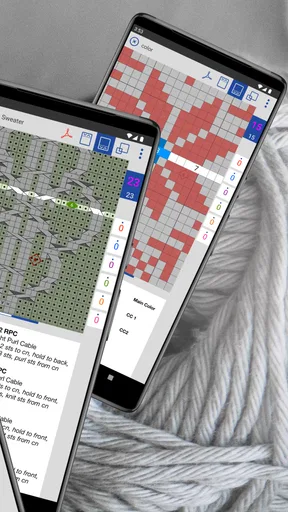
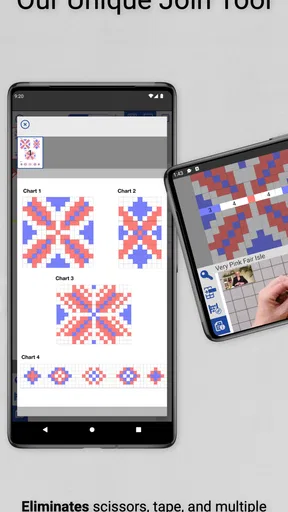
For those who love a good visual guide, the app offers a "Chart Tracker." You can zoom in on charts and use markers to follow along without missing a beat. This feature is particularly useful for visual learners and those tackling intricate designs.
Customization and Personal Touch
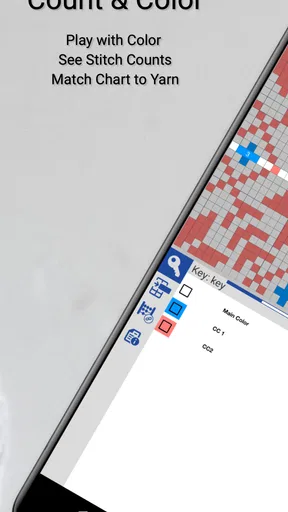
One of the things I personally adore about knitCompanion is its customization options. You can adjust the app’s settings to fit your knitting style. Choose your preferred color themes, adjust the font size for better visibility, and even set up custom reminders. It’s all about making the app work for you.
Worth Reading Before You Choose

EA SPORTS FC Mobile 26 Is a Bigger Football Game, but It Takes Time

Flipboard Shows What News Apps Must Do Beyond the Feed

Switching to Android Auto Means Rethinking Your Driving Routine

Google Calendar Makes a Crowded Week Easier to Manage

Ludo King Makes the Most of the Minutes Between Plans

Baby Panda World Brings Quick Play to Modern Phones, but Its Game Library Feels Busy
The app also integrates seamlessly with cloud services, allowing you to back up your projects so you never lose your progress. Plus, sharing your patterns and progress with fellow knitters is just a click away, making it easy to collaborate or simply show off your latest masterpiece.
In-App Purchases and Subscription
While knitCompanion offers a free version that’s packed with essential tools, you can unlock additional features through in-app purchases or a subscription model. The premium version includes advanced chart tools, more customization options, and the ability to sync across multiple devices. Whether you stick with the free version or upgrade, there's a lot of value to be found.
Final Thoughts
knitCompanion is more than just an app; it’s a knitting partner that accompanies you every step of the way. Its thoughtfully designed features cater to both beginners and experts alike. Whether you're tackling a simple scarf or an elaborate sweater, this app ensures every stitch is accounted for and every pattern is a joy to knit.
If you're serious about knitting and want to elevate your craft, give knitCompanion a try. It’s like having a knitting mentor in your pocket, ready to guide you through your next creative adventure. So, grab your needles, download the app, and let your knitting journey begin!
Pros
- User-friendly interface enhances productivity.
- Integrates seamlessly with popular patterns.
- Customizable tools for personalized knitting.
- Supports multiple devices for convenience.
- Offline access keeps projects available anywhere.
Cons
- Steep learning curve for beginners.
- Limited free features compared to premium.
- Occasional sync issues across devices.
- Requires regular updates for new features.
- May drain battery with extended use.
FAQs for knitCompanion
What is knitCompanion and how does it work?
knitCompanion is a digital tool designed for knitting enthusiasts to manage patterns and projects efficiently. It allows you to track your progress, mark rows, and add notes. The app integrates with cloud services to keep your data synced across devices, ensuring you never lose track of your knitting projects.
Is knitCompanion available on both iOS and Android devices?
Yes, knitCompanion is available for both iOS and Android platforms. Users can download it from the App Store or Google Play Store. The app is optimized for both tablets and smartphones, ensuring a seamless experience across different devices.
Does knitCompanion require a subscription or is it free to use?
knitCompanion offers a free version with basic features, but to unlock its full potential, a subscription is required. The paid version includes advanced tools such as row counters, custom annotations, and pattern management options. Users can choose between monthly or annual subscription plans.
Can I import my existing knitting patterns into knitCompanion?
Yes, knitCompanion allows you to import PDF patterns directly into the app. This feature enables you to organize and manage your existing patterns easily. You can also annotate and customize these patterns with notes and highlights to suit your knitting needs.
How does knitCompanion enhance the knitting experience for beginners?
For beginners, knitCompanion offers a range of tools to simplify the knitting process. Features like chart tracking, progress markers, and customizable counters help new knitters stay organized and focused. The app also provides tutorials and guides to assist users in understanding complex patterns more easily.


